



Digital work instruction software for the shop floor
Last updated:
A work instruction tells one person how to carry out one task correctly: which steps, in which order, with which tools, materials and safety measures, and what the result must look like. Typical examples are a machine changeover, a quality check, a cleaning routine, an assembly step or a goods receipt.
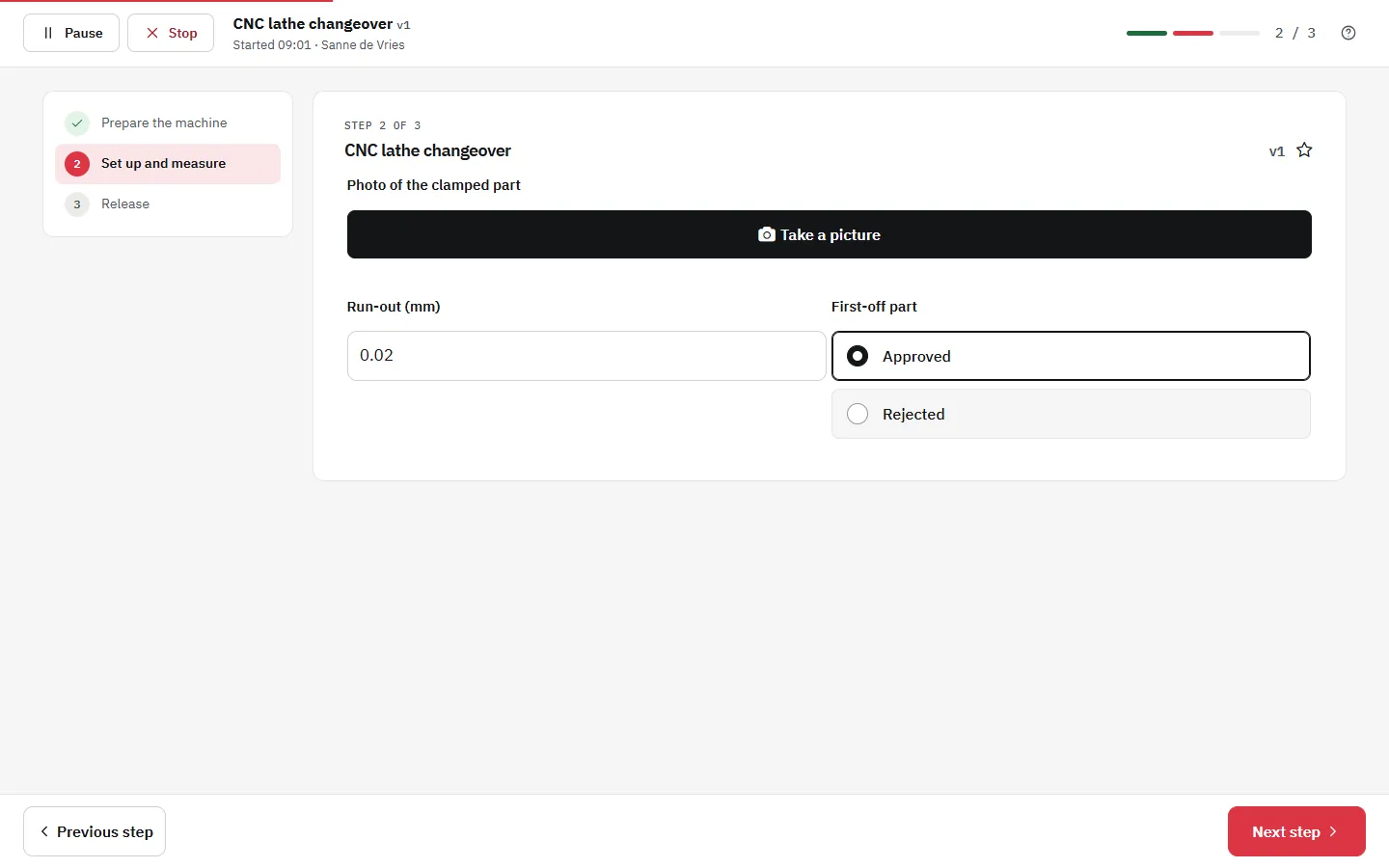
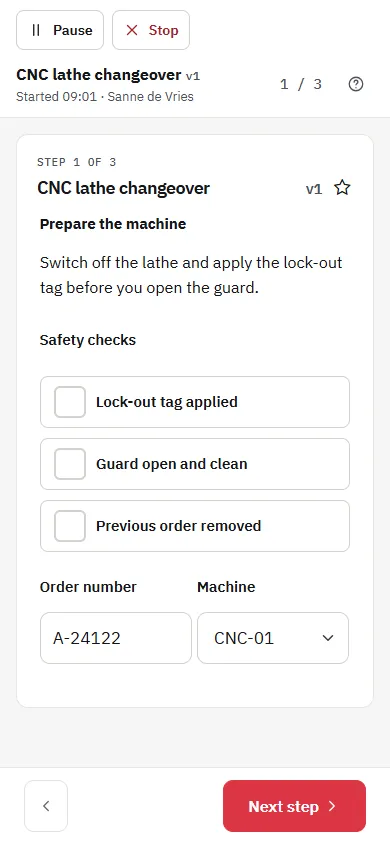
Digital work instruction software replaces paper instructions with visual, step-by-step instructions that operators follow on a phone, tablet or PC at the workstation. In the Work Instruction App each instruction is built from steps with photos, video, checks and input fields, published with version control, and every execution is logged with user, time and results.
A work instruction describes how one specific task is done. That makes it more detailed than an SOP, which describes a process as a whole. Digital work instructions keep that detail usable: operators always see the current version, open it by scanning a QR code or tapping an NFC tag, and their input is recorded for quality control and audits.
What it looks like in the app
Why Use Digital Work Instructions?
Always Accessible
Operators can access instructions anytime, from any device - even right at the machine or workstation.
Visual & Clear
Use photos, diagrams, and videos to make steps easier to follow and reduce ambiguity on the shop floor.
Always Up-to-Date
Digital work instructions are updated once and published as a new version - no more outdated paper binders or PDFs.
Operator Friendly
Work instructions built for the people who use them - easy to understand, follow, and improve together.
Digital Work Instructions vs. Traditional Paper Manuals
Traditional work instructions are often stored in binders or printed on paper. They're hard to update, get lost, and are rarely read. Digital work instructions, on the other hand, are:
- Instantly available on mobile and desktop
- Always reflect the latest process version
- Easier to understand thanks to images and videos
- Connected to SOPs, checklists, and data capture
- Centralized and searchable by all users
By moving to a digital system, teams reduce mistakes, downtime, and wasted effort - while improving speed and safety.
Paper versus digital work instructions at a glance
| Aspect | Paper or PDF | Digital work instruction |
|---|---|---|
| Version in use | Copies of old versions stay in binders and on desks | Only the current published version can be started |
| Finding the instruction | Search in a binder or a shared drive | Scan the QR code or NFC tag at the machine |
| Visual support | Printed photos, often outdated or unreadable | Photos, video and PDF drawings in the step |
| Checks and measurements | Ticked on paper, sometimes afterwards | Required fields per step, stored with user and time |
| Proof for audits | Collect and archive forms by hand | Every run is searchable per instruction, user and period |
| Changing the instruction | Reprint and replace every copy | Publish a new version; it is live everywhere at once |
| Training new colleagues | Depends on who explains it | The same steps for everyone, linked to courses and a skills matrix |
Key Elements of Effective Work Instructions
Great work instructions aren't just checklists - they're living documents that drive clarity, consistency, and performance. Here's what to include:
- Step-by-step structure: Break down tasks into clear, numbered steps.
- Visuals: Use images, diagrams, or videos to show exactly what needs to happen.
- Purpose & scope: Clearly define the goal of the instruction and when to use it.
- Tools & materials: List everything needed to complete the task.
- Safety notes: Highlight hazards and include mandatory PPE instructions where applicable.
- Responsibility: Specify who is expected to perform or approve each step.
- Feedback & improvement: Allow operators to suggest changes and improve instructions over time.
These elements help ensure that instructions are usable, effective, and aligned with your operational goals.
What is a work instruction?
Work instructions sit below procedures in the documentation hierarchy. A policy states what the organisation wants, an SOP describes how a process runs and who is responsible, and a work instruction zooms in on a single task at a single workstation. ISO 9001 does not prescribe work instructions by name, but clause 4.4.2 requires documented information to the extent necessary to support the operation of processes. For tasks where a mistake causes scrap, rework or an unsafe situation, a work instruction is the usual way to provide it (see ISO 9001 and digital work instructions).
How digital work instructions work in the app
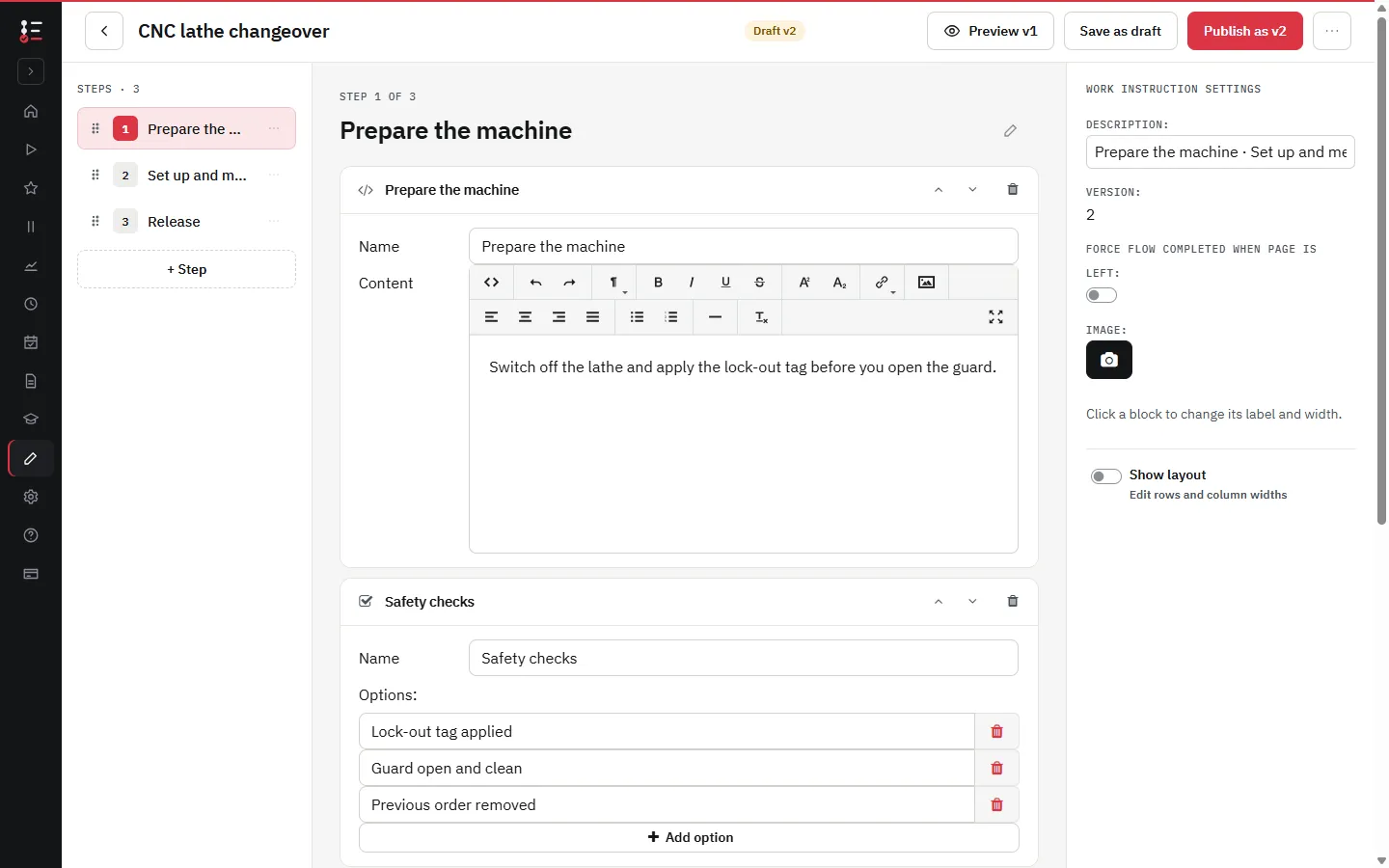
- Build the instruction from steps. Each step holds a short text with a photo, video or drawing of the correct situation.
- Add input where you need evidence: a confirmation, a measured value, a photo, a barcode scan or a signature (see user input).
- Publish the instruction. Operators only see the latest published version; drafts stay hidden until they are published (see version control).
- Open it at the workstation via a QR code, an NFC tag or the list of instructions, in the browser or the Android app.
- Review the executions: who carried out which instruction, when, with which values and photos. Use remarks from operators to improve the next version.
Example: a product changeover on a packaging line
Take a changeover from one product format to another. On paper this is a two-page procedure that experienced operators skip and new operators cannot follow. As a digital work instruction it becomes a sequence of short steps, each with a photo of the correct setting, a field for the measured value where tolerances matter, and a final check before the line restarts.
The shift leader sees which changeovers were completed and by whom, a deviating value is visible the moment it is entered, and when a setting changes, the instruction is updated once and every operator works from the new version on the next shift. The same structure works for maintenance, cleaning, quality inspections and checklists.
Frequently asked questions about digital work instructions
An SOP describes a process: its purpose, scope, roles and the sequence of activities. A work instruction describes one task within that process in enough detail for one person to perform it correctly. In the Work Instruction App both are built the same way, as published step-by-step instructions with version control, so you choose the level of detail per task.
The Work Instruction App is priced per user per month, excluding VAT (NL prices): Execute (following instructions) costs €10, Analyze €50 and Manage (creating and editing instructions) €100. Prices outside the Netherlands differ, see pricing. Every plan starts with a free 30-day trial without a credit card.
Any phone, tablet or PC with a current browser. An Android app is also available on Google Play. Starting an instruction needs an internet connection, so operators always start the latest version; if the connection drops during a run, the answers are kept on the device and sent when it is back.
Yes. The free work instruction template on this page gives a structure you can copy, and the getting started guide shows how to build your first digital instruction in the app.
Create, Manage, and Improve Work Instructions with Ease
Empower your team with visual, mobile-friendly work instructions that evolve with your processes. Try the Work Instruction App for free and simplify your operations.