



Implement GMP-Compliant SOPs with the Work Instruction App
Last updated:
Good Manufacturing Practice (EU GMP, FDA 21 CFR 210/211, and GMP+ for feed) requires that production and quality-control operations follow approved written procedures, that deviations are recorded and investigated, and that records are contemporaneous, attributable, legible, original and accurate (ALCOA). Paper SOPs can satisfy this, but only with strict discipline around versions, signatures and record retention.
GMP-compliant Standard Operating Procedures (SOPs) are approved, version-controlled procedures that operators follow exactly, with a record of every execution. Pharmaceutical, medical device and food producers need them to prove quality, traceability and audit readiness under Good Manufacturing Practice (GMP).
The Work Instruction App makes it easy to create, maintain, and distribute SOPs that meet Good Manufacturing Practice (GMP) requirements - with full version control, audit trails, and mobile accessibility.
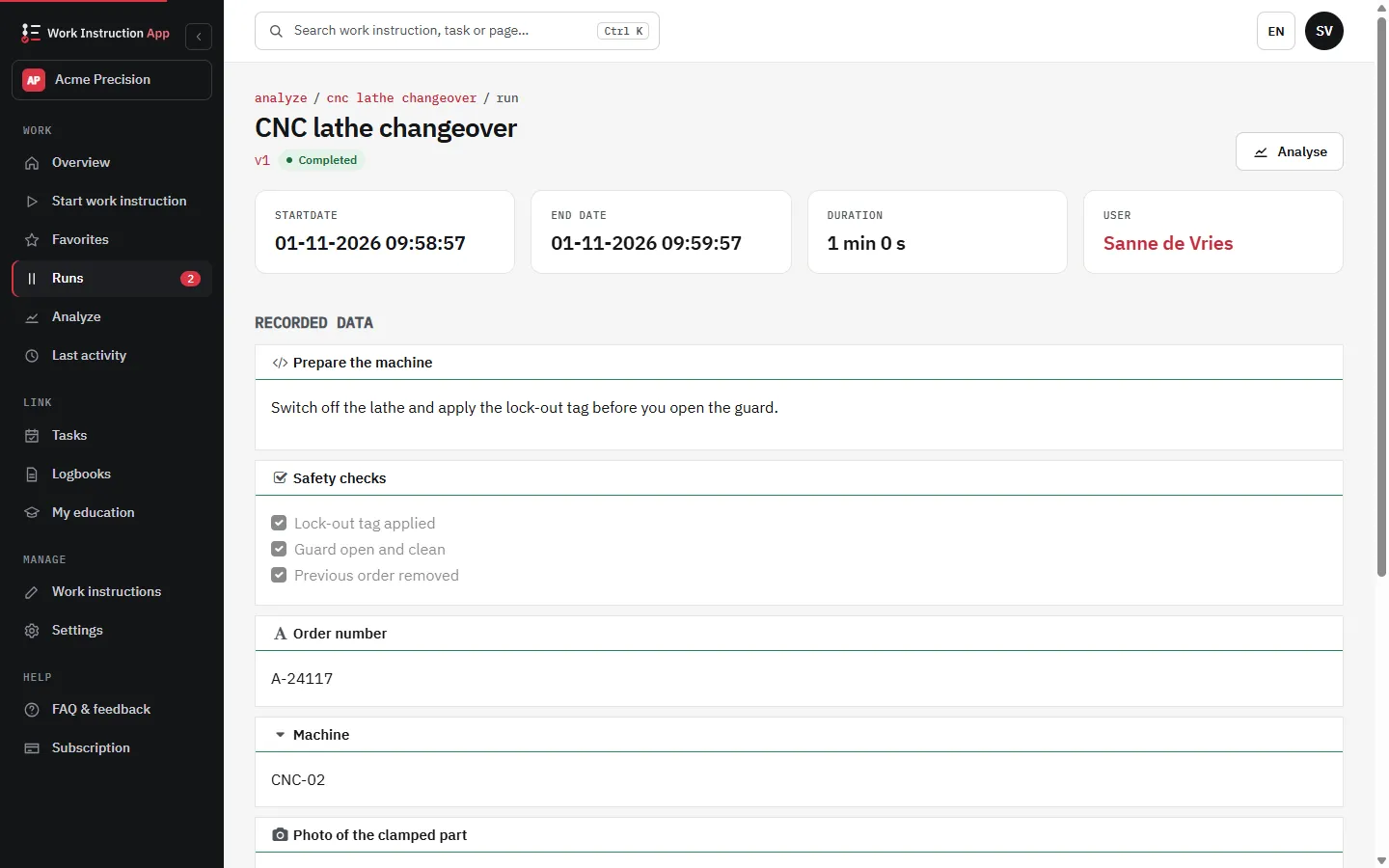
What it looks like in the app
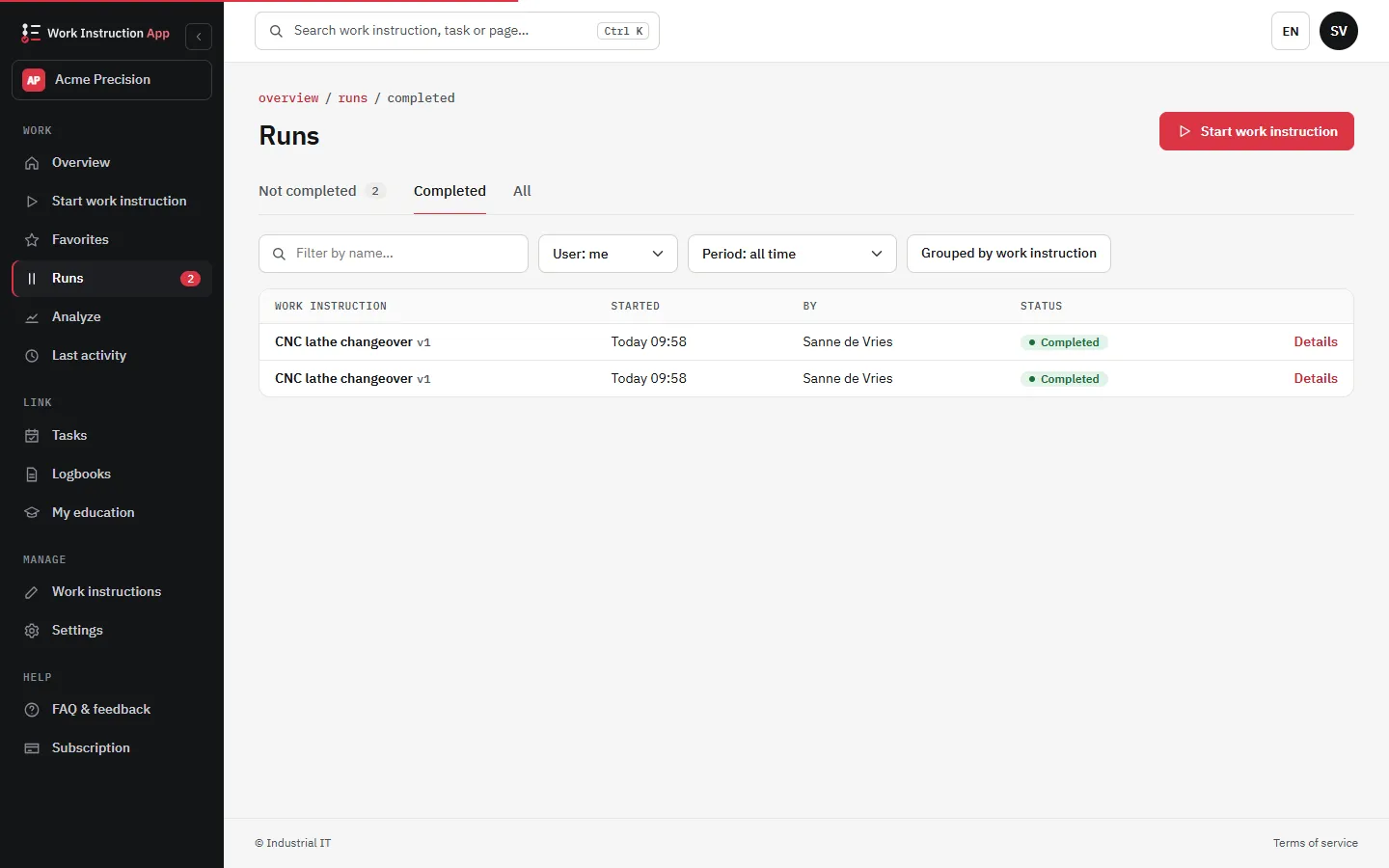
Ensure GMP Compliance with Digital SOPs
Audit-Ready Documentation
Maintain a complete history of SOP updates, approvals, and revisions - with timestamps and user credentials.
Ensure Compliance
Support GMP working practices with version control, an optional review before publishing and approval of runs by a second signer.
Always the Current Version
Operators always access the most up-to-date version of each SOP - reducing deviations and risks.
Role-Based Access
Control who can view, edit, or approve SOPs.
What Makes an SOP GMP-Compliant?
GMP-compliant SOPs must be clear, validated, version-controlled, and traceable. They need to reflect actual practices on the floor, be regularly reviewed, and include documented approvals.
The Work Instruction App simplifies this by offering features designed specifically for regulated industries:
- Document control with an optional review by a colleague before publishing
- Signatures with user and time, and approval of runs by a second signer
- Time-stamped records of every run and a change history per instruction
- Automatic distribution of new versions
- Deviations flagged on the run: values outside a minimum or maximum, an unexpected barcode or a deviating answer
Whether you're preparing for an inspection or meeting ISO standards, the app supports your GxP working practices; validating it as a computerised system remains part of your own quality system.
Industries That Rely on GMP SOPs
SOPs under GMP are critical in regulated sectors where quality, safety, and repeatability must be guaranteed. Our digital SOP system is ideal for:
- Pharmaceutical manufacturing
- Medical device production
- Food and beverage processing
- Cosmetics and personal care
- Biotechnology and laboratory operations
All procedures are stored centrally, with strict access control and instant availability on mobile or desktop - helping you stay inspection-ready at all times.
Digitize and Control Your GMP SOPs Today
Try the Work Instruction App free for 30 days and work with controlled, versioned digital SOPs. No credit card required.
What GMP requires from work instructions
The Work Instruction App turns these requirements into properties of the system: only the published version can be executed, every step is recorded with user and timestamp at the moment it happens, and completed executions keep their original values. Training and qualification are visible in the skills matrix.
How GMP work instructions work in the app
- Draft a procedure, have it reviewed by a colleague with Manage if you switch on Review required, and publish it; only the published version is visible to operators (see version control).
- Operators execute step by step and record values, checks and photos as they go, with the target value shown in the step.
- Values outside a minimum or maximum, an unexpected barcode or an answer marked as a deviation are flagged on the run and listed at the top of the run details for QA (see deviations).
- Records are complete and retrievable per batch, instruction, user or period for inspections and batch release (see audit trail).
- With Approval required, a completed run waits for a second signer: a Manage user who did not perform it approves or rejects it with their own password (see approval and review).
Use case: line clearance before a packaging run
Before a new packaging batch starts, the line must be cleared of materials from the previous product and checked against the packaging order. A digital line-clearance instruction walks the operator through each zone with a reference photo, asks for a confirmation and a photo of the cleared zone and a scan of the new packaging material. The QA release is a signature step at the end.
The inspector no longer relies on a ticked checklist; the photos and timestamps show that the clearance was actually performed, in the right order, by a qualified person.
Frequently asked questions about GMP and digital SOPs
The app supports GMP working practices: versioned procedures, attributable records, completed runs that can no longer be changed and a change history. Validation of computerised systems (GAMP 5, EU GMP Annex 11) is the responsibility of the user; the app is not validated by us. Contact us with questions about how it works.
Yes. Every run can be opened in the app with all values, photos, users and timestamps per step, printed as PDF from its print page, exported per work instruction and period to Excel or CSV, and retrieved through the REST API for your own reports.
A signature step captures a drawn signature with user and timestamp, and a second signer approves a run by confirming with their own password, with name and time recorded. These are not qualified electronic signatures, and we do not claim 21 CFR Part 11 compliance; whether they fit your procedures depends on your user identification and controls. Contact us to discuss your case.
Yes. Each work instruction has a History tab: who created, saved, submitted, approved, rejected, published or retracted which version and when, with a summary of the changed steps, and the start, completion and approval of runs. In the app the log is append-only: entries are never changed or deleted. It supports audits; it does not replace your own validation.