In short: onboarding new operators works when it is a plan instead of a buddy who "shows you around". Start with one week of safety and basics, then train tasks in order of risk, using the same work instructions the operator will follow on the line, and sign off every task separately. Record each sign-off per person, so a skills matrix shows who is qualified for what and you have the evidence ISO 9001 asks for.
Why is onboarding on the shop floor so hard?
Most production teams do not lack goodwill when a new colleague starts. What they lack is structure. Three problems come back in almost every plant:
- The knowledge is in people's heads. The experienced operator knows that the press needs an extra minute after a cold start, which sound means the tool is worn and which customer always gets a second check. None of that is written down. This is tribal knowledge: valuable, but only available while that person is on shift.
- The buddy system has no structure. A new operator is paired with whoever is available. Each buddy teaches their own version of the job, skips what they consider obvious and has a production target to meet at the same time. Two new operators on two shifts end up doing the same task in two different ways.
- There is no proof of competence. After a few weeks the supervisor "thinks" the new colleague can run the line alone. Which tasks were actually practised, who checked them and when, is rarely recorded. When an auditor asks, or when something goes wrong, nobody can show it.
The result is onboarding that takes longer than necessary, depends on luck, and leaves new people uncertain about what is expected of them.
What does a practical onboarding plan look like?
A good onboarding plan has a simple logic: safety first, then the basics everyone needs, then the actual tasks, ordered by risk, each with its own sign-off. The operator is not "onboarded" after a number of weeks, but when every task in their job profile is signed off. The table below is a template you can adapt; the number of weeks depends on your process.
| Week | Focus | Content | Sign-off |
|---|---|---|---|
| Week 1 | Safety and basics | Site rules, emergency routes, PPE, lock-out, hazardous substances, last-minute risk assessment, how to start and read a work instruction, quality basics (what is a defect, who to call) | Safety instruction completed and signed before any production work |
| Week 2 | Low-risk tasks | Tasks where a mistake is easy to see and cheap to correct: material supply, labelling, packing, visual checks, cleaning | Each task signed off after the operator has done it alone, following the instruction |
| Week 3 to 4 | Medium-risk tasks | Machine operation, in-process measurements, standard changeovers, first-piece checks | Signed off per task after a supervised run with recorded values |
| Week 5 and later | High-risk and critical tasks | Safety-critical settings, final inspection, release decisions, troubleshooting | Signed off per task by a qualified assessor, often after more than one supervised run |
| After sign-off | Follow-up | Review after 30 to 90 days, refresher when an instruction changes | New version of the instruction means a new sign-off where it matters |
Two rules make this plan work. First, nobody does a task alone before it is signed off. Second, the sign-off is about the task, not about the person in general: an operator can be qualified for packing and labelling and still be in training for the changeover.
How do you use work instructions as training material?
The best training material is the work instruction the operator will use every day. If you train from slides or a separate manual, you create two versions of the truth, and the version on the line wins. Build the instruction first, then train from it. The guide on how to write a work instruction covers the method; for onboarding, three points matter most:
- A photo or short video per step. A new operator does not yet recognise the correct position of a part or the right reading on a display. A photo taken from where they stand closes that gap faster than any explanation.
- Required checks at critical points. Make the steps where mistakes are expensive into checks the operator must complete: a measured value, a photo of the result, a confirmation. A required step cannot be skipped, so the instruction itself enforces what the buddy might forget to mention.
- Capture what the experienced operator knows. Write the instruction while watching your best operator, and add the checks they do without thinking. This is how tribal knowledge becomes part of the standard instead of leaving the company with that person.
Training then becomes simple: the buddy runs the instruction with the new operator, explains the why behind each step and watches them do it. Paper instructions age quickly; digital work instructions stay current because there is one published version at the workstation.
Paper training records versus digital: what is the difference?
Many plants keep training records on signed paper forms or in a spreadsheet maintained by one person. That works until someone needs an answer quickly.
| Question | Paper forms or spreadsheet | Digital training records |
|---|---|---|
| Who is qualified for this task right now? | Search through binders or ask the supervisor | Read it from the skills matrix |
| Which version of the instruction was the operator trained on? | Usually not recorded | Stored with the completed run |
| Was the training actually done or only signed? | A signature, nothing more | Every step, value, photo and signature of the run is kept |
| Can someone start a task they are not trained for? | Nothing stops them | A required training step can block the instruction until the certificate is there |
| What does an auditor get to see? | A folder that must be complete and up to date | A filtered list of completed runs per instruction, user and period |
| Who keeps the overview up to date? | One person, by hand | It updates when a course is completed |
How do you set up onboarding with courses and job profiles?
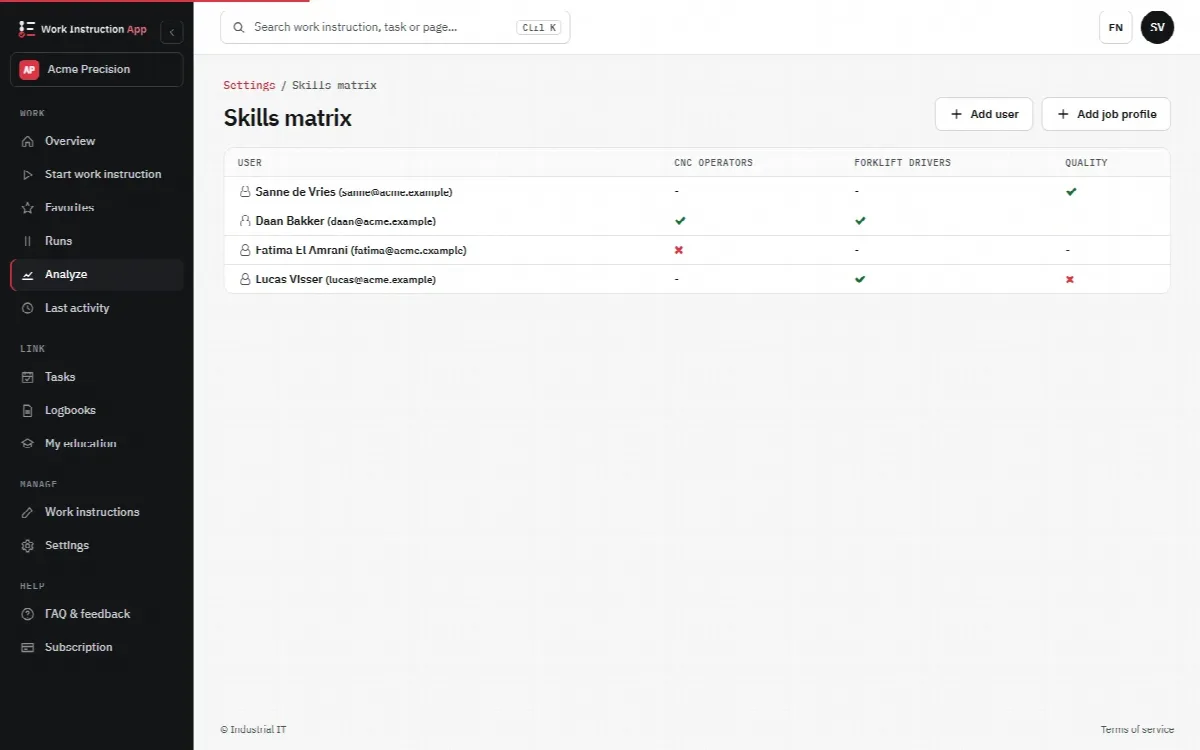
In the Work Instruction App, onboarding is built from three parts: courses, job profiles and the skills matrix. A course is linked to a work instruction; completing that work instruction issues a certificate. A job profile groups the courses a role needs. The skills matrix shows per person which courses are completed. These steps set it up:
1. List the tasks per role
Write down every task a role performs and mark its risk as low, medium or high. Use the people who do the work today to make the list complete, because they know the tasks that never made it into a document. This list becomes your onboarding plan and the basis for the job profiles.
2. Create or improve the work instruction for each task
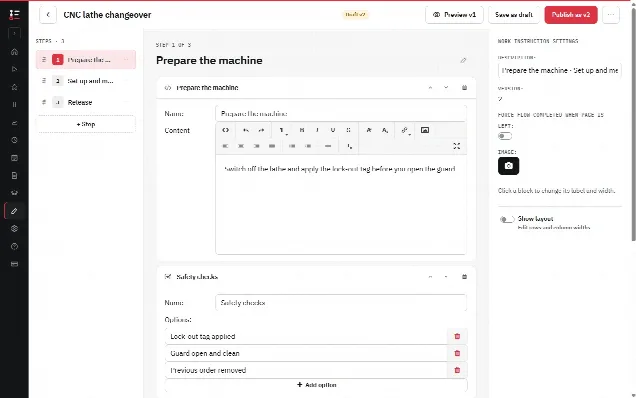
Make sure every task on the list has a published work instruction with photos per step and required checks at critical points. Start with the high-risk tasks and the ones new operators ask about most. If you are new to the app, the getting started guide walks you through the first one.
3. Create a course per task and link it to the work instruction
Under knowledge management, add a course for each task and select the work instruction a participant runs to complete it. Add a final page with a signature step for the assessor if the sign-off must be confirmed by a qualified colleague.
4. Create job profiles and add the courses
Create a job profile per role, for example "Line operator" or "Setter", and add the courses that role needs. Start with the safety course from week 1 so every profile shares the same foundation.
5. Add the new operator to the job profile
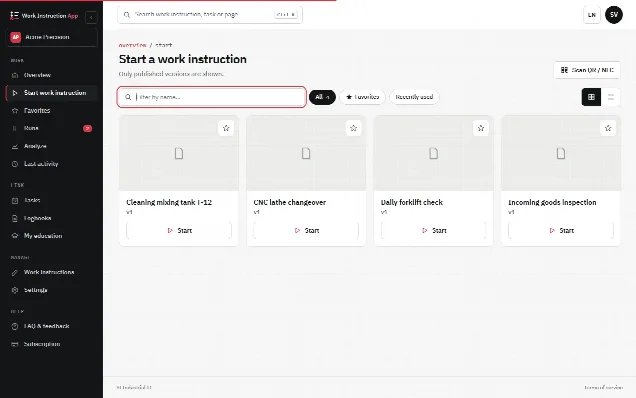
Add the new colleague to the right job profile on their first day. Their open courses then appear under My education, so they and their buddy can see what is still to do.
6. Train, run and sign off task by task
Let the new operator complete each course by running the linked work instruction with their buddy or assessor. When the run is completed, the certificate is issued and the skills matrix updates; every answer, photo and signature of that run is kept with the date, user and version.
7. Block critical tasks for people without the certificate
Add a required training step to the work instructions of critical tasks. Someone without the right certificate then sees which training they are still missing instead of starting the task.
8. Review the skills matrix and plan refreshers
Check the skills matrix regularly with the team leader. It shows where a shift depends on one qualified person and who still has open courses. When a work instruction gets a new version with a significant change, plan a refresher for the people concerned.
How do you keep training records for ISO 9001 and audits?
Clause 7.2 (competence) of ISO 9001:2015 asks an organisation to determine the competence needed for people whose work affects quality, to make sure they are competent on the basis of education, training or experience, to take action where they are not and evaluate whether that action worked, and to retain documented information as evidence of competence. In practice an auditor wants to see three things:
- What competence is needed: the job profiles with their courses.
- That people have it: the skills matrix and the certificate per person.
- How you know the training worked: the completed run of the course work instruction, with the values, photos and signature of the assessor.
Because each run records the version of the instruction, you can also show which people were trained on the current version after a change. More about what the standard asks is on the ISO 9001 page.
In practice with digital work instructions
A new operator starts with the safety course on a tablet or phone. They are added to the job profile "Line operator", see their open courses under My education and work through them with a buddy, one task at a time. Each course is a normal work instruction with photos, required checks and a signature of the assessor at the end. When it is completed, the certificate is issued and the skills matrix shows the new qualification. Critical instructions carry a required training step, so the operator cannot start them before they are signed off. The team leader sees at a glance who can be scheduled for which task, and the quality manager has the training records ready for the next audit. How the pieces fit together is explained on the knowledge management page.