In short: most disputes about damage to rental equipment come down to one question nobody can answer: what did the machine look like when it left? Record the same things at check-out and at return (condition, hour meter, fuel or charge level, accessories, damage photos from fixed angles and the customer's signature), and do a safety inspection before the machine goes out again. With a QR code or NFC tag on each machine, the right checklist opens on the spot and every check-out and return is stored with date, user and photos.
Why do disputes about damage to rental equipment arise?
A machine comes back with a dent in the bonnet, a cracked light or a missing charger. The customer says it was already like that. Without evidence from the moment of check-out, the rental company has two options: write off the repair or risk an argument with a customer it wants to keep. Both cost money.
The causes are almost always the same:
- No record at check-out. The machine leaves in a hurry, early in the morning, and nobody writes down the condition.
- A vague record. "Some scratches" on a paper form proves nothing about a specific dent.
- Photos without a system. A few phone photos taken from random angles, stored on someone's phone, cannot be compared with photos at return.
- No signature. The customer never confirmed the condition, so the record is only the rental company's word.
- Different people, different checks. The colleague at check-out checks other things than the colleague at return.
The solution is not more paperwork, but the same short, fixed checklist at both moments, with photos from the same angles and a signature.
What should you record at check-out and at return?
Use one checklist for both moments, so every point can be compared directly. The table shows what to record and why.
| Item | At check-out | At return | Evidence |
|---|---|---|---|
| Machine identification | Scan the QR code or NFC tag, confirm the fleet or serial number | The same scan | Machine number in the record |
| Hour meter or odometer | Reading at departure | Reading at return | Number field plus a photo of the display |
| Fuel or charge level | Level at departure | Level at return | Selection or slider plus a photo of the gauge |
| Exterior condition | Photos from fixed angles | The same angles | Required photos |
| Existing damage | Note and photograph every known damage | Check for new damage | Close-up photo plus description |
| Accessories | Tick off what goes along: keys, charger, attachments, manual | Tick off what came back | Checkboxes |
| Cleanliness | Clean or not | Clean, dirty, needs cleaning | Selection plus photo |
| Operation and safety | Function test done, safety devices working | Any malfunctions reported | Checkboxes and text |
| Instruction to the customer | Customer instructed on safe use | Not applicable | Checkbox |
| Customer confirmation | Signature and name of the customer | Signature at return, where possible | Signature step |
How do you photograph damage so it holds up?
Photos only settle a dispute if the photos at check-out and at return can be compared. That requires the same angles every time. A practical set for most machines:
- Front, straight on, with the whole machine in view.
- Left side, from the front corner.
- Rear, straight on.
- Right side, from the rear corner.
- The hour meter or odometer and the fuel or charge gauge.
- Wear parts that cause most discussions: tyres or tracks, bucket or forks, glass.
- A close-up of every existing damage, with something for scale where possible.
Put an example photo for each angle in the checklist itself, so a new colleague takes the same picture as an experienced one. Make the photos required: if a photo is missing, the check-out cannot be completed.
What safety inspection is needed between rentals?
A machine that goes from one customer to the next has to be safe every time it leaves. Regulations in Europe require work equipment that is exposed to deterioration to be inspected, with the results recorded: in the United Kingdom under the Provision and Use of Work Equipment Regulations (PUWER), as described by the HSE, and in Germany under section 14 of the Betriebssicherheitsverordnung (BetrSichV) on inspection of work equipment. Statutory periodic inspections by a qualified person stay necessary; the check between rentals is the practical layer on top of that.
The check between rentals typically covers:
- Visual inspection of structure, guards and safety devices.
- Function test of controls, brakes, emergency stop and warning devices.
- Leaks, damaged hoses and cables.
- Presence and readability of warning labels and the operator manual.
- Whether the next statutory inspection is still valid for the rental period.
Record the inspection with the name of the inspector and the date. A machine that fails the check gets a clear status, so it does not go out again by accident.
How do you set up check-out and check-in step by step?
1. Give every machine a unique identification
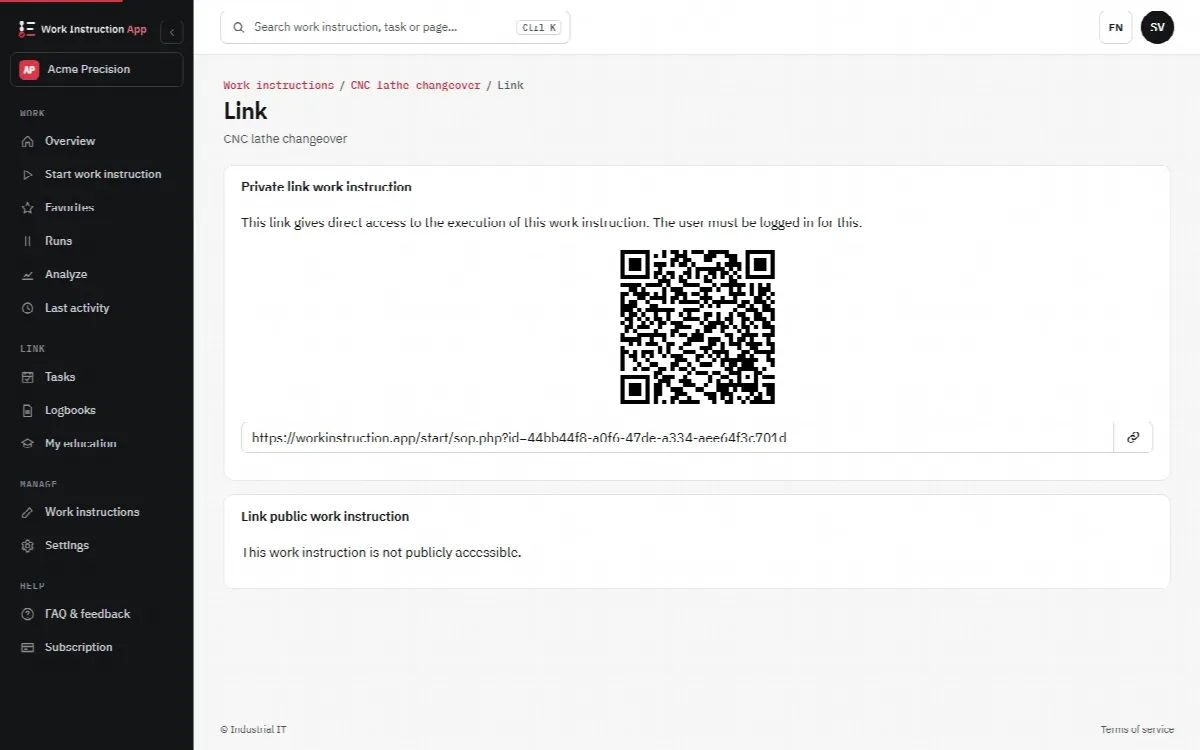
Give every machine or tool a fleet number and attach a QR code or NFC tag with that number in a place that does not get damaged or dirty quickly. That tag is the starting point of every check-out, return and inspection.
2. Define one checklist per machine type
Make a checklist per machine type, because an aerial work platform needs other checks than an excavator or a generator. Use the table above as a starting point and remove what does not apply.
3. Fix the photo angles with example photos
Decide which photos are required and add an example photo for each angle. This makes photos from check-out and return comparable, regardless of who takes them.
4. Record existing damage at check-out
Walk around the machine with the customer present where possible, and photograph and describe every existing damage before the machine leaves. Damage that is recorded at check-out is not a discussion at return.
5. Let the customer sign
Ask the customer to confirm the recorded condition and accessories with a signature and their name. Combined with the photos, this is the evidence that makes a later damage claim clear.
6. Use the same checklist at return
Repeat the same checks and photos at return, and compare readings and damage with the check-out record. Report new damage directly, with close-up photos.
7. Inspect before the next rental
Do the safety inspection and cleaning before the machine is available again. Only release it when the inspection is completed, and note what was found in the machine's history.
Why a history per machine pays off
When every check-out, return and inspection of a machine is stored in one place, patterns become visible: a machine that comes back damaged repeatedly, a part that wears faster than expected, a customer who always returns machines without fuel. That history is useful for maintenance planning, for pricing and for the conversation with the customer. It also shows a supplier or insurer what the condition of the machine was at each moment.
In practice with digital work instructions
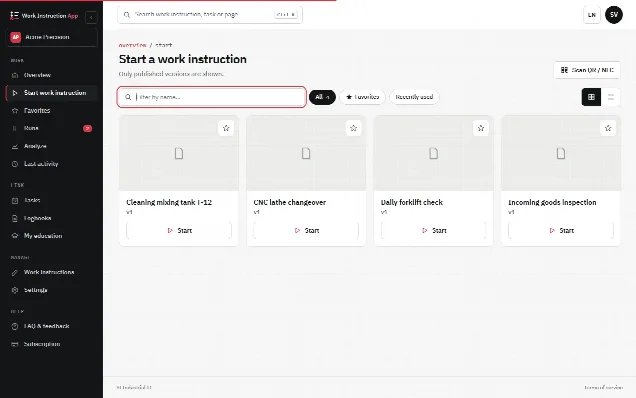
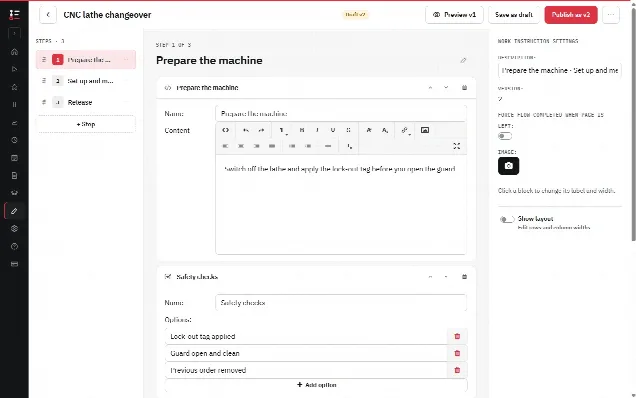
In the Work Instruction App you build the check-out, return and inspection as work instructions with steps: number fields for the hour meter, a selection or slider for the fuel or charge level, checkboxes for accessories, required photo steps for the fixed angles with an example image next to each, a text area for damage and a signature step for the customer. A location step can add the GPS position at check-out or return when that is useful, for example when a machine is handed over on a building site.
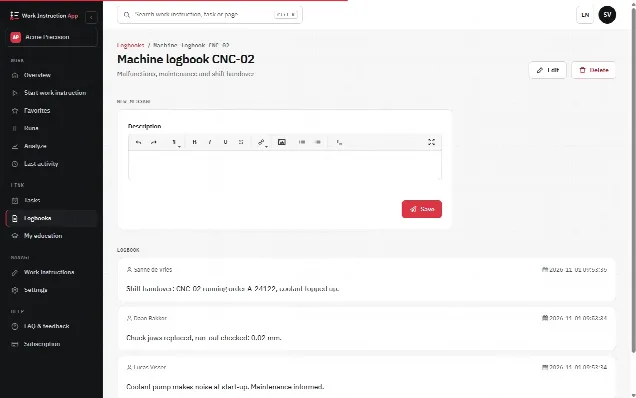
The work instruction opens by scanning a QR code or an NFC tag on the machine; the Android app from Google Play can write the NFC tags. Every run records the user, the start and end time, the version of the work instruction and every answer, photo and signature, and completed runs can be filtered per work instruction, user and period. For a history per machine, give each machine its own work instruction that starts from its tag: the completed runs of that instruction are then the history of that machine. One instruction per machine type is easier to maintain; the fleet number is then recorded in each run (typed in or scanned as a barcode), and the search in answers finds all runs of one machine by that number. Next to that, a logbook per machine collects remarks from the workshop, the drivers and the rental desk in one place.
The app works on any modern phone, tablet or PC with a browser. Starting a check needs a data connection; a check that has been started keeps working in a yard without coverage and is sent once the connection is back. More examples for rental companies are on the page about inspection software for rental equipment, and the general approach is explained in why digital work instructions.