In short: ALCOA+ is the set of principles regulators use to judge whether a record can be trusted. Data must be attributable, legible, contemporaneous, original and accurate (ALCOA), and also complete, consistent, enduring and available (the "+"). On the shop floor that means every value, tick box, photo and signature shows who recorded it, when, and in what context, and stays readable and retrievable for as long as you must keep it.
What does ALCOA+ stand for?
ALCOA started as a short checklist for good documentation practice in the pharmaceutical industry. The FDA guidance Data Integrity and Compliance With Drug CGMP: Questions and Answers (December 2018) describes complete, consistent and accurate data as data that is attributable, legible, contemporaneously recorded, original or a true copy, and accurate. The PIC/S guidance PI 041-1 (July 2021) and the UK MHRA GXP Data Integrity Guidance and Definitions (March 2018) add the attributes complete, consistent, enduring and available. Together these nine words are known as ALCOA+.
The principles apply to paper and electronic records alike. A batch record on paper, a checklist on a clipboard and a digital run on a tablet are all judged by the same questions. The difference lies in how much effort it takes to meet them.
What does each principle mean on the shop floor?
Abstract definitions do not help an operator at 6 in the morning. Here is each principle with an example from production.
- Attributable: you can tell who recorded the data and when. Example: the line clearance before a new batch is ticked off by a named operator, not by "the morning shift".
- Legible: the record can be read and understood, now and in five years. Example: a measured fill weight of "12.5" that nobody can confuse with "17.5".
- Contemporaneous: the data is recorded at the moment the work is done. Example: the temperature of a cleaning solution is written down when it is measured, not at the end of the shift from memory.
- Original: the first capture of the data, or a verified true copy. Example: the scale printout or the first entry of the reading, not a value retyped later into a spreadsheet.
- Accurate: the data is correct and reflects what really happened. Example: a torque value comes from a calibrated tool and is within the specified range, or the deviation is recorded.
- Complete: all data is there, including repeats, failed attempts and corrections. Example: a rejected first sample stays in the record next to the approved second sample.
- Consistent: the sequence of events is logical and dates and times agree. Example: the end time of a cleaning step is not earlier than its start time.
- Enduring: the record lasts for the full retention period. Example: no pencil, no thermal paper that fades, no sticky notes.
- Available: the record can be found and read when an auditor or investigator asks for it. Example: the run of last March is retrieved in minutes, not after a day in the archive.
Paper or digital: where does each principle break down?
Paper is not forbidden, and a digital system is not automatically compliant. But the typical weaknesses differ. The table compares a paper form with a digital run record.
| Principle | Typical risk on paper | How a digital run record helps |
|---|---|---|
| Attributable | Initials that are hard to trace, or one person signing for the team | Every run is linked to the logged-in user |
| Legible | Handwriting, smudges, corrections over the original value | Typed values, fixed choices, photos instead of descriptions |
| Contemporaneous | Forms filled in afterwards, times rounded or guessed | Start and end time are recorded by the system, not typed |
| Original | Values copied from a scrap of paper to the official form | The value is entered once, at the point of work |
| Accurate | Wrong field filled in, unit missing | Number fields, selections and required blocks reduce entry errors |
| Complete | Empty fields that nobody notices | Required blocks: the run cannot be finished with gaps |
| Consistent | Dates in different formats, steps done out of order | A fixed sequence of steps and system timestamps |
| Enduring | Fading ink, coffee, water damage, lost pages | Stored in a database with backups |
| Available | Binders in an archive, searching takes hours | Runs filtered by work instruction, user and period |
A digital system only helps if it is configured and used well. If everyone shares one login, attributability is gone, however good the software is. ALCOA+ is a property of your whole process: people, procedures and tools.
How does a digital run record support ALCOA+?
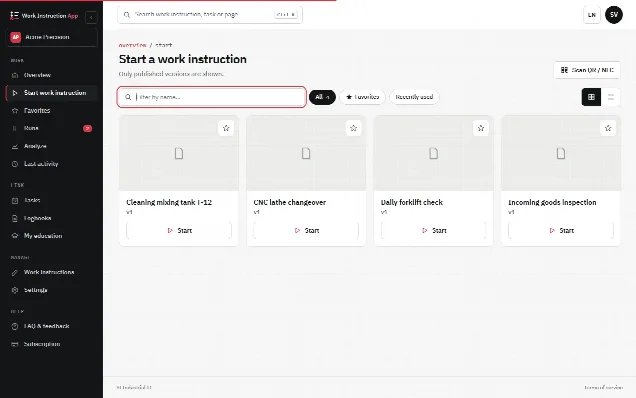
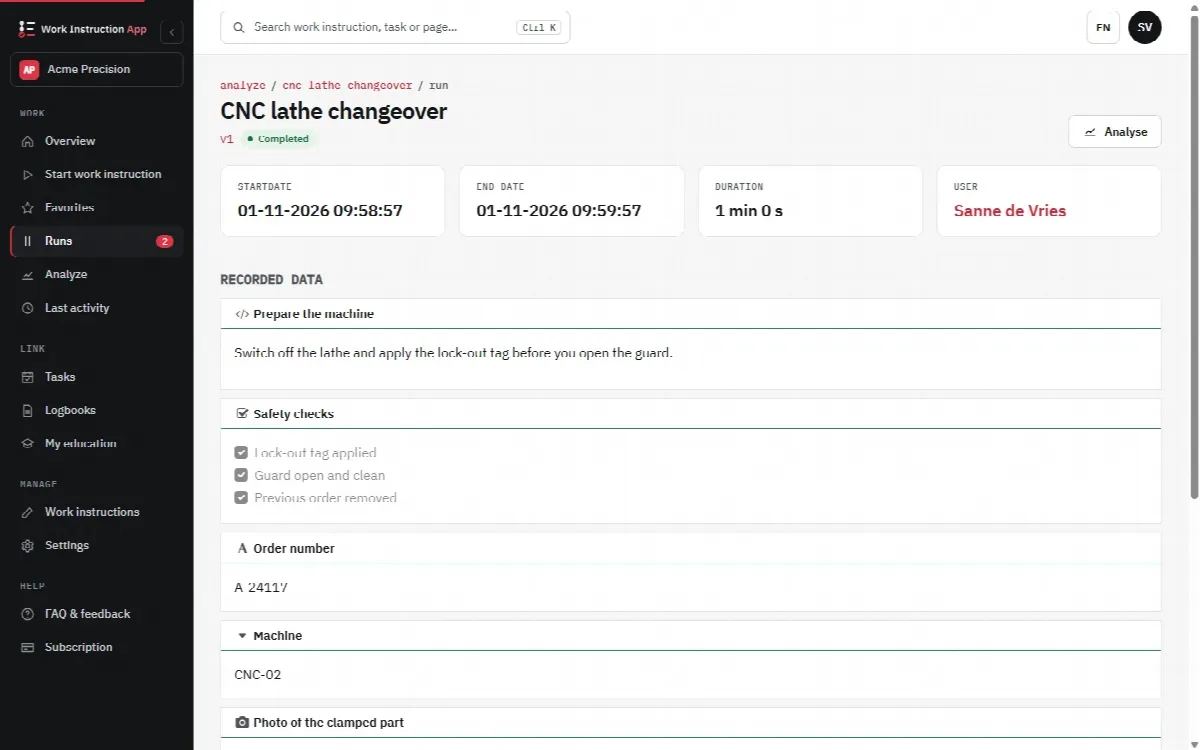
When a work instruction is carried out digitally, each execution becomes a run: a record of one person working through one version of the instruction. A good run record contains:
- The user. Who performed the run, based on a personal login.
- Timestamps. When the run started and ended, and how long it took.
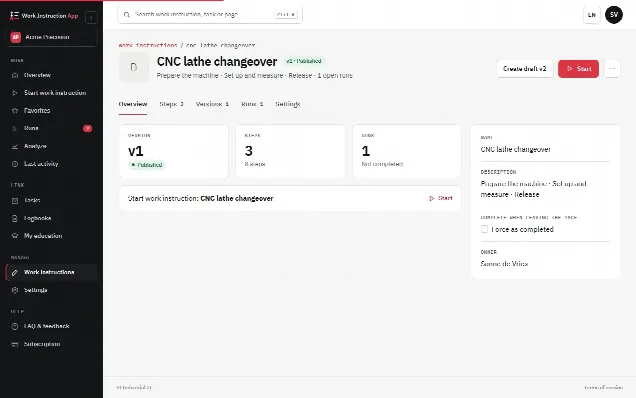
- The version. Which version of the work instruction was followed, so you can later see exactly what the operator was asked to do.
- The original values. Numbers, text, choices and tick boxes as they were entered at the workplace.
- Photos and signatures. Visual evidence captured during the work, such as the state of a machine after cleaning, and a drawn signature where a confirmation is needed.
This covers attributable, contemporaneous and original by design. Required blocks and structured input (numbers, selections, scans) support accurate and complete. Storage with backups supports enduring, and a run history you can filter supports available. Read more about the value of digital records in why digital work instructions.
What does a digital system not solve for you?
Software is a tool, not a certificate. In a regulated environment (GMP, GDP) you remain responsible for:
- Personal accounts. No shared logins, no passwords on a sticky note at the terminal.
- Procedures for corrections. Who may correct a record, how the reason is documented and how it is reviewed.
- Review of records. Someone checks completed runs before a batch is released, as your quality system requires.
- Validation. If the records are GMP-relevant, you assess and validate the system for your intended use. Our page on GMP explains the context.
- Retention. How long records are kept and how they are archived when you change systems.
The guidance documents are explicit that data integrity is also a matter of culture. If people are under pressure to produce "good" numbers, no system will stop them from writing down what is expected instead of what they measured. A quality culture in which reporting a deviation is normal is as important as any technical control.
How do you apply ALCOA+ to your work instructions?
Start with the records that matter most: those that support batch release, safety or a customer requirement. For each one, walk through the nine principles and ask where the record is weakest today. Then design the work instruction to close that gap:
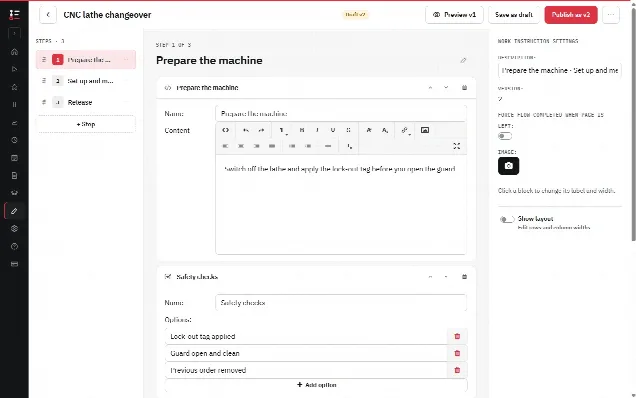
- Make every critical value a separate, required block with a clear label and unit.
- Ask for a photo where a description would be vague, for example "line clear" or "seal intact".
- Use a fixed selection instead of free text where only a few answers are valid.
- Add a step that tells the operator what to do when a value is out of range, so the deviation is recorded instead of hidden.
- End with a confirmation or signature where your procedure requires one.
A clear instruction also helps accuracy: if the operator understands the step, the recorded value is more likely to be right. The guide how to write a work instruction covers that side.
In practice with digital work instructions
In the Work Instruction App every run stores the user, start and end time, duration, the version of the work instruction and every answer, photo and signature. Blocks such as number, text field, selection, checkbox, barcode scan and photo capture data at the point of work; blocks marked Required must be filled in before the operator can continue. Published work instructions get a version number (v1, v2 and so on) and older versions stay traceable, which is explained under version control. Completed runs can be filtered per work instruction, user and period, so an auditor's question about a specific date, person or work instruction is answered from the run history. For a question about one batch or serial number, the search in answers (at least three characters) finds the runs in which that value was entered. For what auditors typically ask, see the audit page; the terms used here are explained in the glossary.
A completed run is final and can no longer be changed. Who created, saved, published, retracted or deleted a work instruction, and who started, completed, reopened, approved or rejected a run, is kept in an append-only change log: the History tab of the work instruction and the History block on the run details. Where a second person must check a record, set Approval required on the work instruction: a completed run then waits until a Manage user who is not the performer approves or rejects it with their own password.
The app supports your data integrity; it does not replace your own validation, procedures and review. Each customer decides for its intended use whether and how the app fits its quality system.